LoRaWAN Gateways
🧭 Introduction
A LoRaWAN Gateway is a central networking component in the LoRaWAN architecture, acting as a bridge between LoRa-based end devices (sensors, meters, actuators) and the internet or cloud platform like OmniWOT.
While end devices transmit data over long-range radio (LoRa), gateways receive this data wirelessly and forward it over IP (Ethernet, Wi-Fi, or Cellular) to the LoRaWAN Network Server (LNS). This enables low-power, long-range, and scalable communication ideal for IoT deployments.
🧱 Why Gateways Are Essential
- Bridge Edge to Internet: Handle the transition from LoRa (non-IP) to standard IP networks
- Enable Scalability: A single gateway can serve hundreds or thousands of devices
- Multi-Device Coordination: Operate as transparent forwarders, allowing the LNS to deduplicate and route data
- Long-Range Communication: Extend communication up to 15 km in rural areas, and 2–5 km in urban zones
📊 LoRaWAN Architecture & Communication Flow
[LoRa Device] ←── LoRaWAN ──→ [Gateway] ←── IP ──→ [Network Server] ←── API ──→ [OmniWOT Platform]
Component Roles:
- LoRa Device: Battery-powered sensor transmitting over unlicensed sub-GHz spectrum
- Gateway: Always-on device that receives LoRa and forwards over IP (acts as packet forwarder)
- Network Server (LNS): Handles authentication, deduplication, message integrity, and routing
- OmniWOT Platform: Receives data for visualization, automation, alerting, and API delivery
🧬 Core Gateway Responsibilities
| Function | Description |
|---|---|
| LoRa Reception | Listens for LoRa messages across multiple channels and spreading factors |
| Packet Forwarding | Forwards valid uplink messages to Network Server using IP-based protocols (UDP, MQTT, HTTPS) |
| Downlink Transmission | Receives downlink commands from LNS and transmits them to end devices |
| Time Synchronization | Provides time-based scheduling for Class B/C end devices (using GPS or NTP) |
| Edge Buffering | Some gateways buffer data locally during backhaul outages and resend later |
🛰️ Types of LoRaWAN Gateways
LoRaWAN Gateways come in various form factors, network roles, and hardware capabilities, depending on the deployment scale, environment, and connectivity needs. Here's a detailed breakdown:
🔹 1. Based on Deployment Architecture
🏠 Indoor Gateways
- Use Case: Small-scale deployments, testing, or personal/home IoT setups.
- Features:
- Compact and plug-and-play
- Limited range (~100–500 meters indoors)
- Fewer channels (typically 1 to 8)
- Connectivity: Wi-Fi or Ethernet
🏢 Outdoor Gateways
- Use Case: Urban, industrial, or rural deployments requiring long-range coverage.
- Features:
- Weatherproof, rugged enclosure (IP65+)
- Higher range (up to 15+ km in rural areas)
- Full 8-channel LoRa support
- Connectivity: Ethernet, Cellular (4G), sometimes Wi-Fi
🔹 2. Based on Channel Capacity
⚙️ Single-Channel Gateways
- Use Case: Development or proof-of-concept only.
- Limitations:
- Not LoRaWAN-compliant
- Cannot support ADR (Adaptive Data Rate) or Class B/C devices properly
🛠 Multi-Channel Gateways
- Use Case: Production-grade deployments
- Benefits:
- Simultaneous listening on multiple frequencies and spreading factors
- Fully LoRaWAN-compliant
🔹 3. Based on Backhaul Connectivity
🌐 Ethernet Gateways
- Most common for fixed infrastructure with stable internet
- Easy to configure, low latency
📶 Cellular Gateways
- Ideal for remote areas (no LAN/Wi-Fi)
- Uses 3G/4G LTE SIM cards to connect to the LNS
📡 Wi-Fi Gateways
- Suitable for temporary installations or labs
- Not reliable for outdoor or industrial setups
🔹 4. Based on Network Role
🧠 Packet Forwarder Gateways
- "Dumb" Gateways: Only forward LoRa packets to LNS
- Examples: Semtech UDP Forwarder, Basic Station
🧠💻 Intelligent Gateways
- Include edge processing, local rules, or pre-processing
- Run software like ChirpStack or custom edge apps
- Useful for low-latency, offline fallback, or edge AI
🔹 5. Based on Power Source
🔌 AC-Powered Gateways
- Used in buildings, smart cities, factories
☀️ Solar-Powered Gateways
- Used in agriculture, wildlife monitoring, and off-grid deployments
⚡ Gateway Features & Specifications
| Feature | Description |
|---|---|
| Protocol Support | Listens on LoRa (PHY) and communicates with LNS via IP (TCP/UDP/MQTT/HTTPS) |
| Multi-Channel | Supports simultaneous listening on multiple frequency channels |
| Coverage Range | Up to 10+ km in rural areas; varies based on antenna and terrain |
| Power Options | AC-powered (buildings, cities) or Solar-powered (agriculture, off-grid) |
| Deployment Flexibility | Indoor/outdoor mounting on rooftops, ceilings, towers |
| Data Forwarding | Acts as Packet Forwarder or Basic Station to relay data to LNS |
🚀 Adding a Gateway to OmniWOT
Step-by-Step Guide
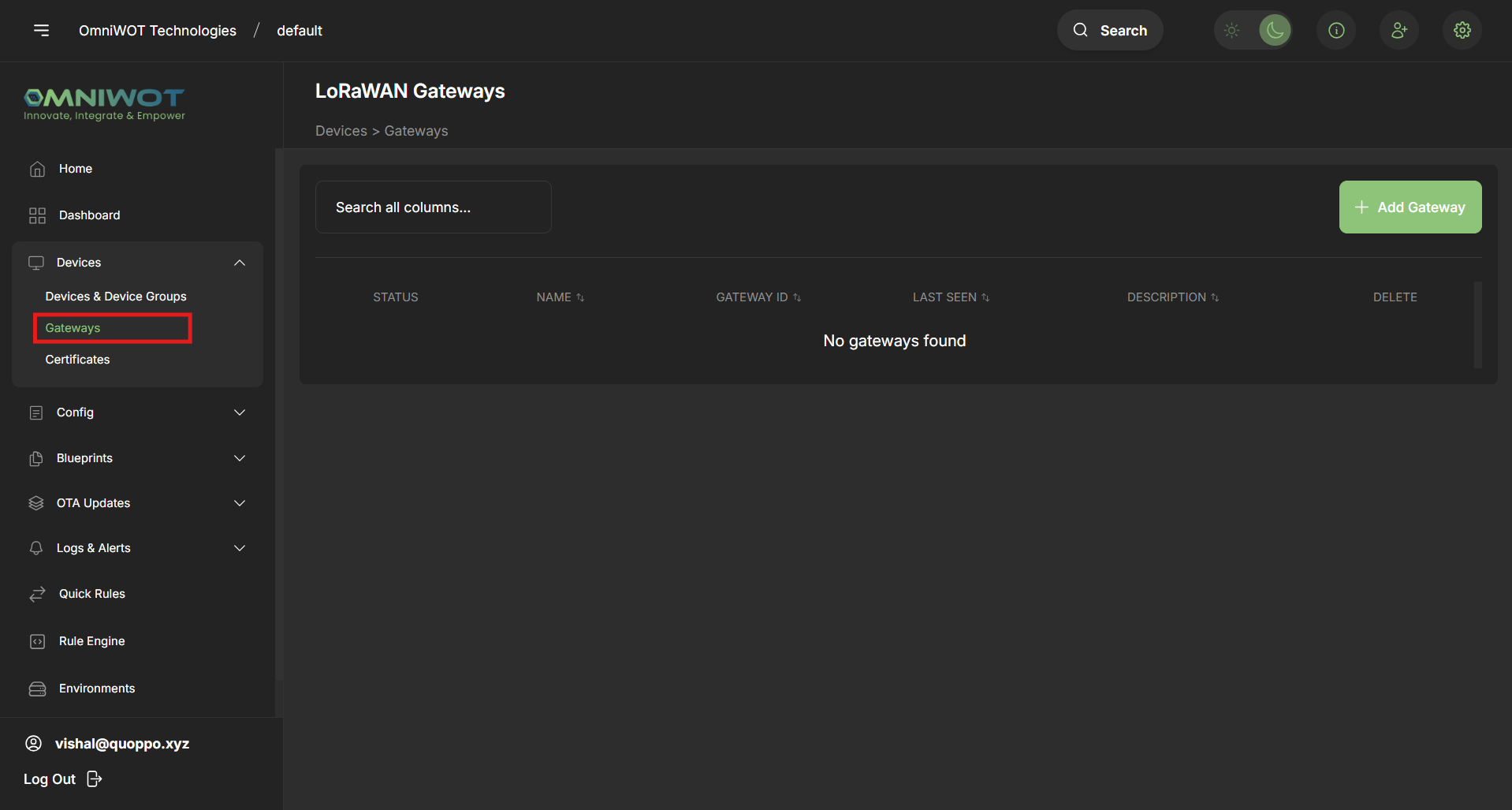
Step 1: Navigate to Gateways
- On the sidebar, click Devices > Gateways
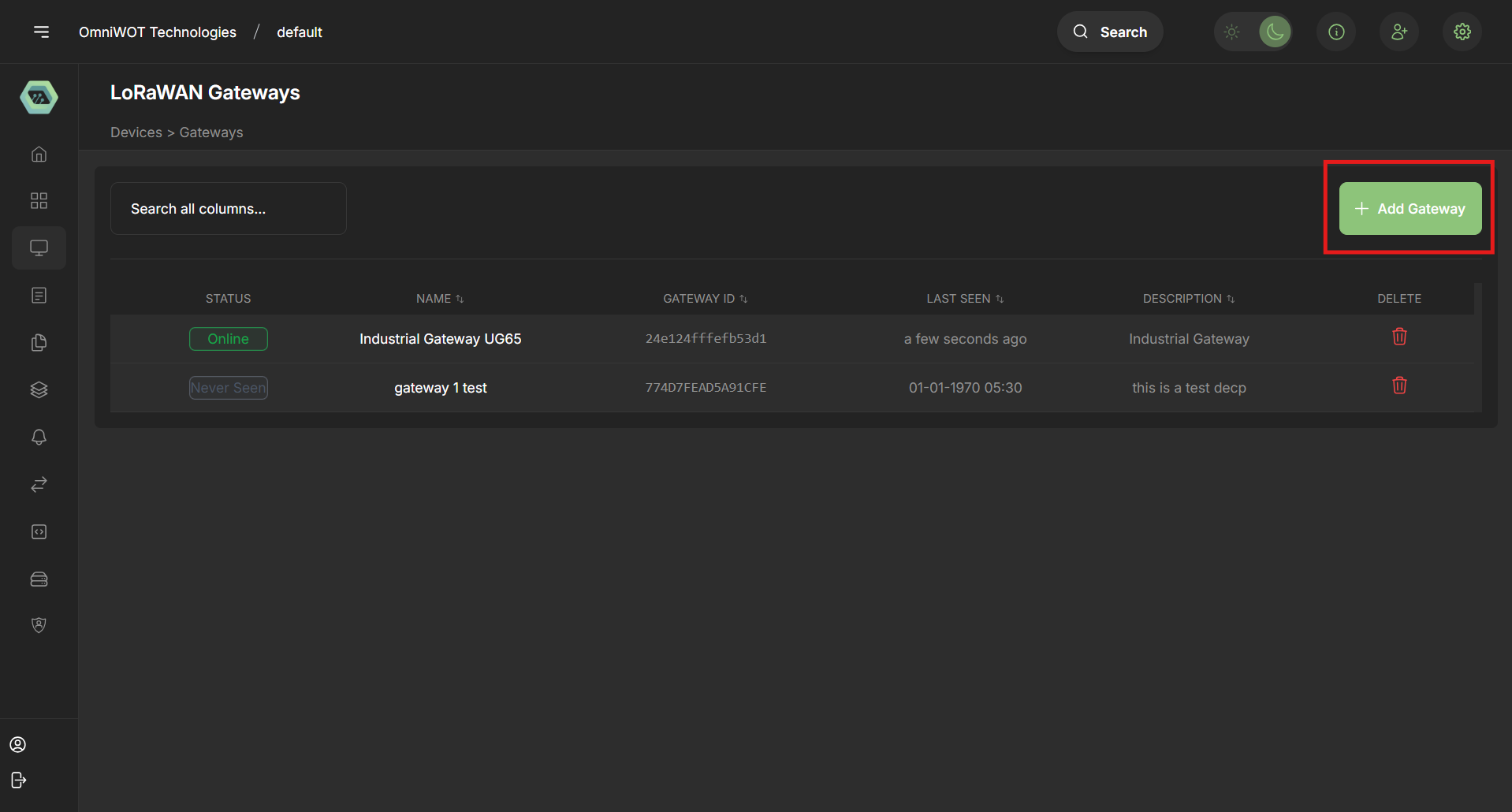
Step 2: Click "Add Gateway"
- A new form will appear titled Add Gateway
Step 3: Fill in Gateway Details
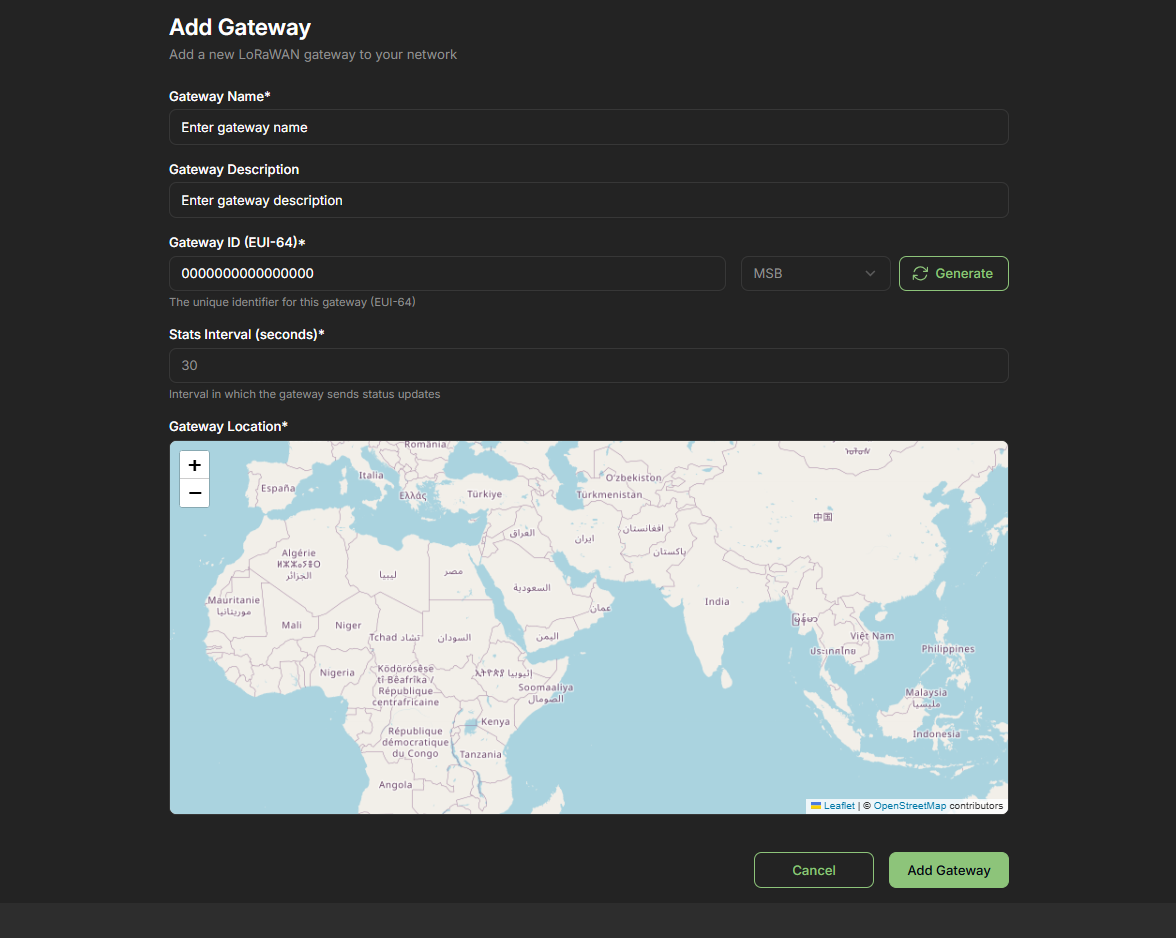
| Field | Description | Example |
|---|---|---|
| Name | Friendly name for your gateway | "Field-Gateway-01" |
| Description | Purpose, location, or identifier info | "North field soil monitoring node" |
| Gateway ID (EUI-64) | Unique identifier of the gateway hardware | A840411CB5DA1178 |
| Stats Interval | Frequency for stats reporting (seconds) | 30 |
| Location | Latitude, longitude, elevation (optional) | Lat: 28.61, Lon: 77.23 |
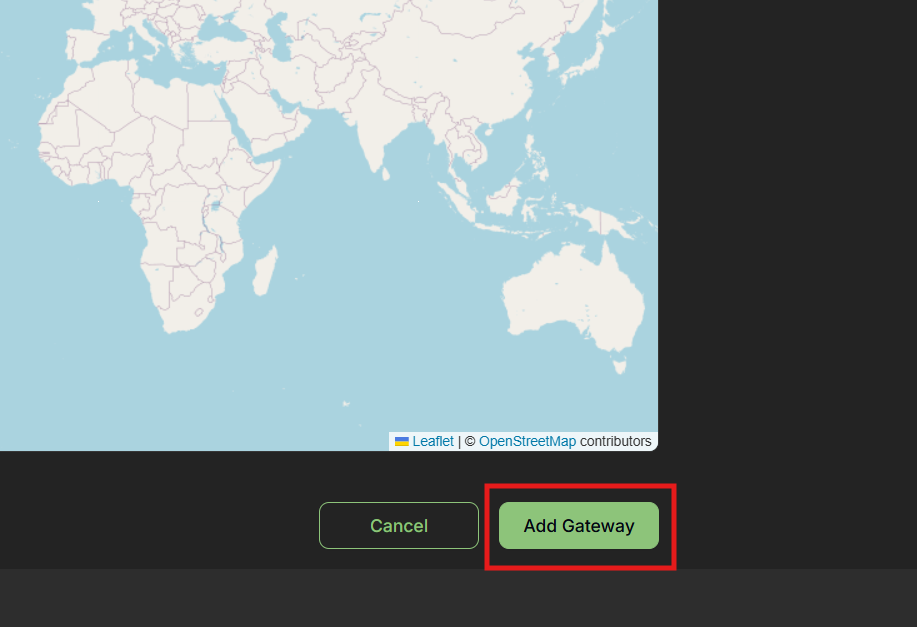
Step 4: Click "Add Gateway"
- The new gateway will be listed and start receiving messages once connected
🔧 Gateway Configuration for OmniWOT
Packet Forwarder Settings
Packet Forwarding is the process by which a LoRaWAN Gateway receives wireless data from end devices and forwards it to the LoRaWAN Network Server over IP. The gateway acts purely as a relay without processing the payload.
Required Configuration Settings
| Setting | Value |
|---|---|
| Service Provider | chirpStack |
| Server Address | lora.omniwot.com |
| Uplink Port | 1700 |
| Downlink Port | 1700 |
🔐 Device Onboarding & Gateway Registration
Gateway Role in Device Onboarding
Gateways are essential for device onboarding as they:
- Receive LoRa messages from end devices, including join requests and uplink data
- Forward messages to the LoRaWAN Network Server over IP (HTTPS, MQTT, or UDP)
- Enable Over-The-Air Activation (OTAA) for secure device network joining
OTAA Process Flow
- End device sends a Join Request
- Registered gateway picks up the request and forwards to network server
- Server processes request, generates session keys, and sends Join Accept back through gateway
- Device successfully joins the network and can begin data transmission
Important: Without a registered and online gateway, the OTAA join process cannot complete.
Gateway Registration Benefits
- ✅ Reliable OTAA join process
- ✅ Secure transmission of device data
- ✅ Centralized control and visibility via OmniWOT dashboard
- ✅ Efficient routing and deduplication of messages
- ✅ Support for multi-gateway redundancy in high-density deployments
📈 Network Behavior & Communication
| Behavior | Explanation |
|---|---|
| Packet Forwarding | Gateways forward all LoRa messages, including duplicates |
| Multiple Gateway Support | Devices can be heard by multiple gateways (improves redundancy) |
| Uplink Communication | Data sent from device to LNS |
| Downlink Communication | Commands sent from LNS to device (via gateway) |
| Heartbeat/Stats Reporting | Gateways periodically report status, packet counts, and health metrics |
🏗️ Deployment Best Practices
Optimal Positioning
- Position high and unobstructed: Rooftops or towers offer better LoRa signal reach
- Use outdoor enclosures for weather protection in outdoor deployments
- Consider antenna placement for maximum coverage and minimal interference
Network Configuration
- Enable GPS or set accurate coordinates for better geolocation and routing
- Use Ethernet or stable cellular connection to ensure reliable uplink to Network Server
- Configure appropriate stats interval to balance monitoring needs with network overhead
Maintenance & Monitoring
- Update firmware regularly to ensure stability and security
- Monitor gateway status through OmniWOT dashboard
- Track packet statistics to identify performance issues
- Plan for redundancy in critical deployments
📚 Glossary
| Term | Definition |
|---|---|
| LoRa | Long Range radio modulation used by end devices |
| LoRaWAN | Protocol stack built on LoRa for networking and device management |
| Gateway | Device that receives LoRa and forwards over IP |
| Network Server (LNS) | Validates, deduplicates, and routes LoRaWAN messages |
| OTAA | Over-The-Air Activation – secure device joining method |
| Packet Forwarder | Software running on gateway to route data to LNS |
| ADR | Adaptive Data Rate – LoRaWAN feature to optimize data transmission |
| EUI-64 | Extended Unique Identifier – 64-bit unique identifier for devices |
🎯 Conclusion
LoRaWAN Gateways are vital components for building scalable, power-efficient IoT networks. By bridging low-power devices to the internet, they enable real-time monitoring, automation, and data-driven decisions across agriculture, smart cities, and industrial deployments.
The OmniWOT platform provides an intuitive and powerful interface for managing these gateways, from initial onboarding to ongoing performance monitoring. Proper gateway configuration, optimal deployment, and active monitoring ensure the best performance from your LoRaWAN network.
Key Takeaways:
- Gateways are essential bridges between LoRa devices and IP networks
- Proper registration and configuration are critical for network functionality
- Strategic deployment maximizes coverage and reliability
- Regular monitoring ensures optimal performance and early issue detection